Clinical Data Management
How software development practices can improve clinical data management.
I worked for years as a Clinical Data Manager running clinical trials and then I became a Software Developer and what I learnt make me realise just how compliant CDM processes could be.
Here are my learnings from how software development best practices can make Clinical Data Management more compliant.
1. Test-Driven Development
Common CDM practice is to write the UAT scripts _after_ the CRFs have been configured. But the nest practice in software is to write your tests first.
This is especially relevant for mid-study modifications:
- Identify an issue with the current EDC setup
- Write a UAT script targeting the issue
- Assert that the script currently results in a failure
- Amend the EDC
- Assert that the script passes
The main difference here is step 3; this is your control arm. By asserting the test fails _before_ the fix is implemented and passes afterwards, you are ensuring that the test actually tests what you think it is testing.
2. The Code is the Documentation
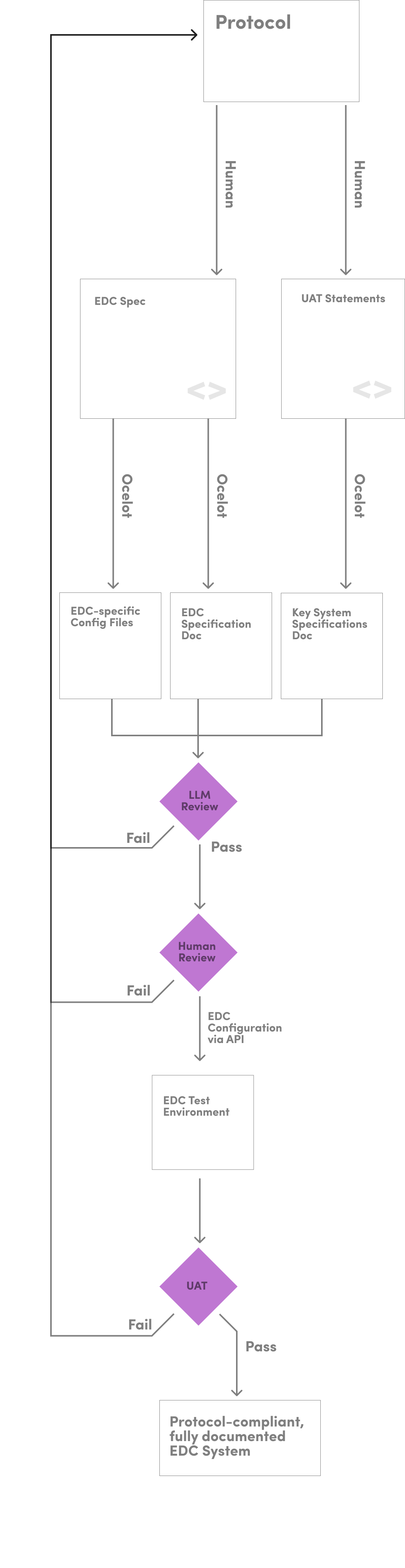
Common CDM practice is to translate the Protocol into the Database Specifications and Database Validation Plan documents and then to translate them again into EDC configurations and then to translate them again into a UAT script. This involves multiple serial manual translations, each one with the opportunity to introduce error. We cannot avoid manual translations altogether because our input (the Protocol) is prosaic, non-exhaustive and often open-to-interpretation, but we can avoid re-inventing the wheel. Here is my process:
Before starting this process you will need to get and validate a package to convert between human-readable summaries and EDC configuration file. For this reason I created Ocelot.
- Manually convert the Protocol into a set of critical statements eg "The logging of Serious Adverse Event in the EDC must automatically notify the Study Team by email" or "All subjects who respond 'Female' to 'Sex' must complete the 'Pregnancy Test CRF'". These are the most important statements that define the success of your CRF. It is not a holistic list. These statements will become your CRF script.
- Verify this list against the Protocol. This is a valid case for an LLM.
- Get sign off on this list
- Use Ocelot to generate the UAT script. The UAT scripts will contain the most recent commit hash of the software, for reproducibility.
- Exhaustively go through the Protocol with study staff to generate the study questions (assuming we are not able to pick them from a CRF library). This should be an iterative process starting at a high level (schedule of events) and eventually going down to sufficient detail for each field that you can fully configure the EDC system. By the end of this process you should have a structured file (eg JSON, YAML, TOML) with sufficient structured data to configure the EDC system.
- Verify this document against the Protocol. This is a valid case for an LLM.
- Study staff are unlikely to want to read a machine-readable file, so use Ocelot to convert the file into a human-readable format. The document should contain the most-recent commit hash of the software used, so it is reproducible. This document is your Database Specifications Document. You may want to add some prose to explain how to interpret it. Get sign off from the study staff that the exhaustive documentation matches their interpretations of the Protocol.
- Load the EDC configuration into your EDC (Ocelot only works with OpenClinica currently).
- Test the configured study against the UAT scripts. Assuming no issues in Ocelot, then a failure must be indicative of multiple interpretations of the protocol or a an error in step 5, which was not caught at step 7.
By following this process, your Database Specifications cannot deviate from your EDC configuration and the chances of errors in the UAT script are minimised.
3. Don't Automate your Test Suite
You may think, given the above point that I'm always in favour of automation, but it is context-dependent. Generating your UAT script automatically from your machine-readable EDC Specifications file may seem initially like a no-brainer. After all it ensures that the UAT script tests exactly what the EDC configuration does and what's more you will be essentially guaranteed a 100% test pass rate. But therein lies the rub. A guaranteed 100% pass rate every time, renders UAT completely redundant as you are only testing the script to generate the config file (which should have already been validated) and not the interpretation of the protocol.
So the protocol should always be manually translated twice: once to generate the list of criticial true statements which become the UAT script and once more to generate a comprehensive study configuration. Then these 2 interpretations can be tested against each other. There is a good argument to say that these two interpretations should be done independently by different people, so that potentially ambiguous statements are more likely to be picked up on and discussed.
4. Get Git
Many EDCs do not support configuration with text files, but instead rely on XLSX (OpenClinica and RedCAP, I'm looking at you). XLSX files cannot easily be tracked in Git. Ocelot allows you to store the XLSX configurations as YAML and then Git track the YAML configs. This means you have a proper 21 CFR-Part 11 compliant immutable audit log of your EDC specifications and you have commit hashes you can reference to refer to specific versions, not just of the EDC configs, but also the versions of software used to generate the documentation.
Summary
In sum, Clinical Data Management relies heavily on human attention to detail as a single source of failure in EDC design and testing, when automated deterministic methods are easily within reach. This is the reason I wrote the Ocelot package and I intend to expand it to work with more EDCs like RedCAP and MACRO in the future.